ARDUINO / ESP32 WORKBENCH

Pinway IDE.

Write, build, and flash firmware, wire components on a virtual breadboard, design display UIs, and connect your hardware — all inside one unified ecosystem.

Ecosystem Modules 04
01 / WORKSPACE RUST / TAURI · IOT DEV · CROSS-PLATFORM

02 / ECOSYSTEM PHILOSOPHY

What makes Pinway IDE special?

IoT development is usually scattered across five disconnected apps: a code editor, a breadboard tool, a display UI builder, and separate web dashboards. Pinway brings the entire workflow into one native, connected workspace where every stage understands the previous one.

01

Write Code

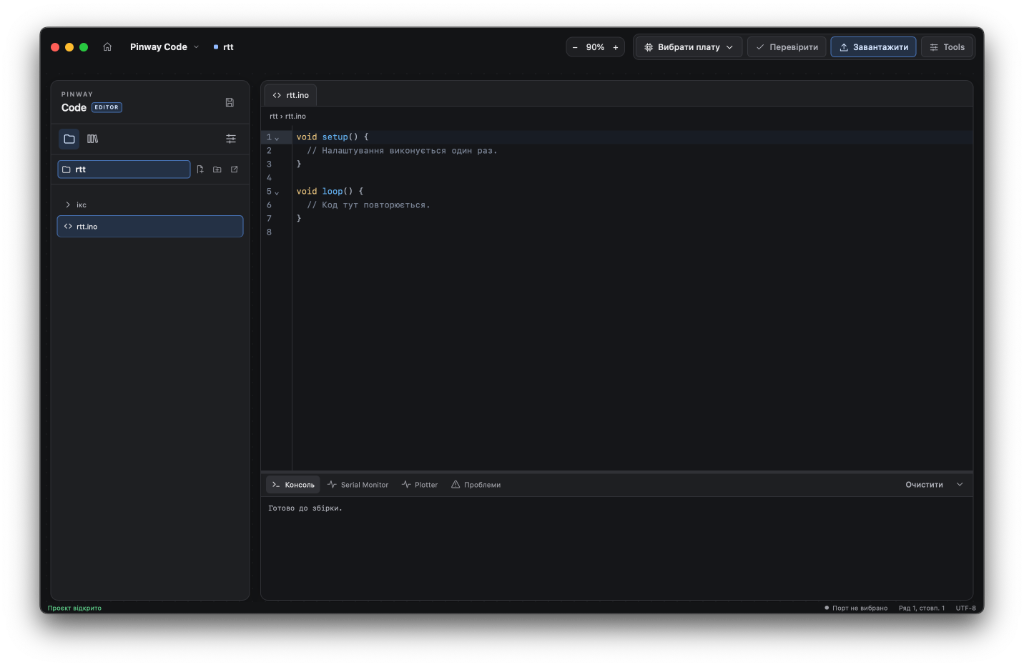
Firmware logic, sensors, and global variables in Arduino C++ inside Pinway Code.

02

Wire Hardware

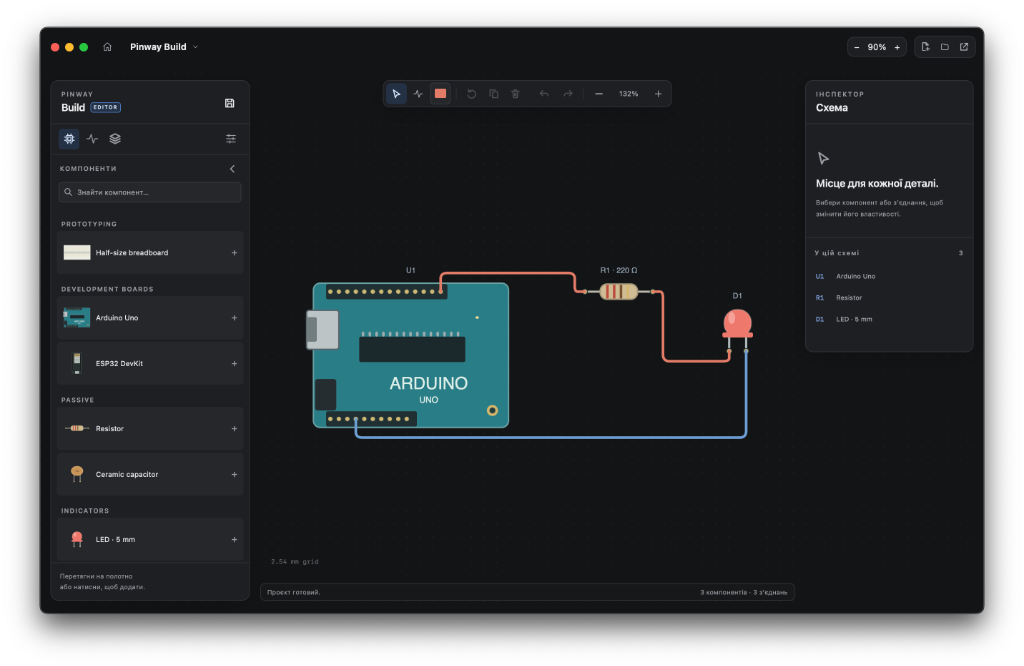
Place boards, resistors, and LEDs on the canvas inside Pinway Build.

03

Design Display UI

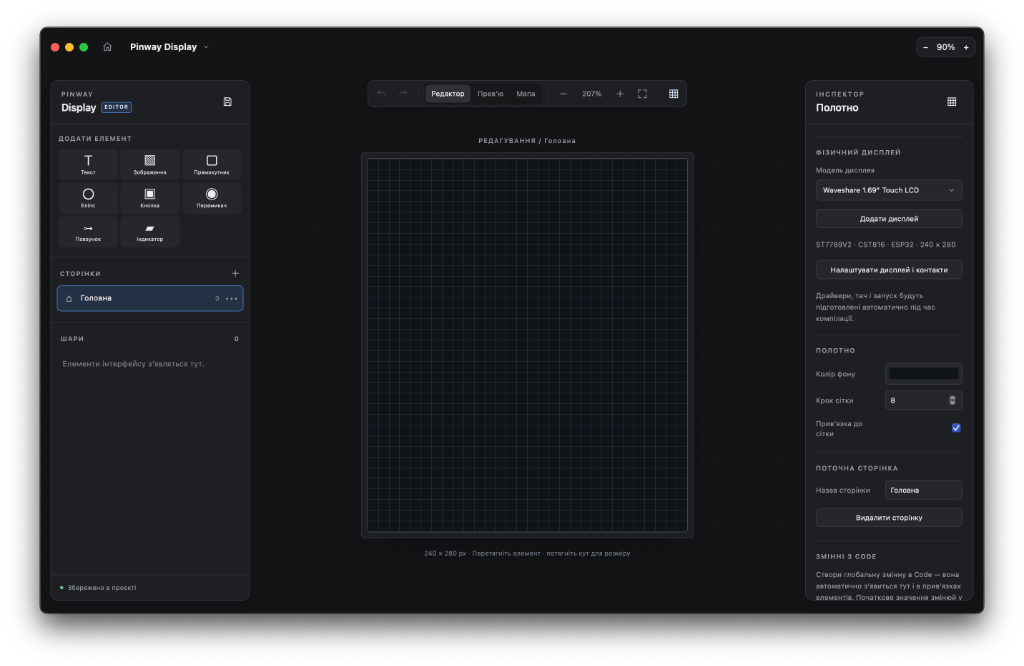
Build screen layouts and bind them directly to your code variables in Pinway Display.

04 · IN DEVELOPMENT

Web Control

Browser dashboards and remote device control in Pinway Web — planned for upcoming releases.

DATA BINDING

Code Variables → Straight to UI

Declare a global variable in Pinway Code and it automatically appears in the Pinway Display inspector ready to bind to sliders, buttons, or indicators. Zero manual glue code.
AUTO-CONFIG

Display Drivers Without Pain

Pick your physical display model (like Waveshare 1.69" Touch LCD with ST7789V2 · CST816) — drivers, touch input, and initialization code are prepared automatically at compile time.

ONE PROJECT

Unified Workspace

Firmware, wiring schematics, UI layers, and port settings live together. Switch seamlessly between Code, Build, and Display in one native window without losing context.

03 / WORKBENCH TOOLS

Four modules — one system

Explore real screenshots of Pinway IDE and see how each module handles its part of the IoT workflow.

Pinway Code interface: Arduino C++ editor, project tree, console, and Serial Monitor
Pinway Build interface: visual breadboard with Arduino Uno, resistor, and LED
Pinway Display interface: UI designer for Waveshare 1.69 Touch LCD with live Code variables
IN DEVELOPMENT · COMING SOON

Pinway Web

The next stage of the ecosystem: a browser-based control panel for live telemetry and variable syncing is currently in development and will arrive in future releases.

Real screenshot of Pinway Code — firmware editor with board selection, verification, and upload.

04 / ARCHITECTURE

Built for speed and precision

RUST & TAURI

Cross-Platform Native

Powered by Rust and Tauri for instant startup, tiny memory footprint, and native desktop performance across platforms.

ARDUINO & ESP32

Full Firmware Pipeline

Compilation, board selection, USB/Serial port handling, live monitoring, and real-time data plotting.

VISUAL SCHEMATICS

Clear Hardware Layout

Effortless placement of boards, components, and wire connections on the canvas before building on your desk.

OPEN ECOSYSTEM

Open Development

Actively developed in the open repository Zen7q/Pinway-IDE with a focus on real maker & IoT workflows.

Andrii Binio (Zen7q)

05 / CREATOR

Andrii Binio @Zen7q

IoT systems and embedded tools developer working with ESP32 hardware (including the GarageGhost workshop voice assistant). Pinway IDE was built to turn electronics development from a fragmented set of utilities into one cohesive, enjoyable workflow.